Mobile app development tools help developers design, build, test, deploy, and maintain applications for smartphones and tablets. The right tools can simplify development workflows, improve application quality, and make long-term maintenance easier.
The demand for mobile applications continues to grow as businesses invest in digital products and mobile-first experiences. According to The Business Research Company, the global mobile application market is projected to grow from $313.88 billion in 2025 to $602.51 billion by 2030, representing a compound annual growth rate (CAGR) of 13.9%.
The best mobile app development tools in 2027 depend on your project requirements, target platforms, budget, and technical expertise. Flutter and React Native support cross-platform development, while Android Studio and Xcode provide dedicated environments for native applications. Other tools, such as Firebase, Figma, Appium, and Postman, support backend services, interface design, testing, and API integration.
In this guide, we compare 15 mobile app development tools, including their key features, advantages, limitations, and ideal use cases, to help businesses, startups, and developers choose the right technology stack. Understanding the custom mobile app development process can also help you select the right tools for your project’s requirements and long-term goals.
What Are Mobile App Development Tools?
Mobile app development tools are software applications, frameworks, platforms, and services used to create, test, deploy, and maintain mobile applications. They support different stages of the development lifecycle, including interface design, programming, backend integration, quality assurance, and release management.
For example, Flutter and React Native help developers build cross-platform applications, Figma supports interface design and prototyping, Firebase provides managed backend services, and Appium enables automated mobile application testing.
Types of Mobile App Development Tools
Mobile app development tools generally fall into six categories:
- Development frameworks: Provide reusable components and structures for building applications.
- Integrated development environments (IDEs): Offer coding, debugging, build, and testing capabilities.
- UI/UX design tools: Help teams create wireframes, prototypes, and user interfaces.
- Backend development tools: Support authentication, databases, APIs, notifications, and cloud services.
- Testing tools: Help identify functional, compatibility, usability, and performance issues.
- Collaboration tools: Support version control, code reviews, project coordination, and automated workflows.
Most projects use a combination of tools rather than relying on a single platform. The right combination depends on application complexity, team experience, integration requirements, and long-term maintenance needs.
How to Choose the Best Mobile App Development Tools in 2027
Before selecting a tool, evaluate how well it fits your application requirements and development workflow. A suitable tool should support your target platforms while remaining practical to maintain as your product evolves.
1. Native vs. Cross-Platform Development
Native development uses platform-specific technologies to build applications for individual operating systems. Android Studio supports Android development, while Xcode is Apple’s primary development environment for its platforms.
Cross-platform frameworks such as Flutter and React Native allow developers to share much of their code across supported platforms. This can reduce duplicated work, although some platform-specific functionality may still require native code.
Choose native development when your application requires extensive platform-specific integration or specialized device capabilities. Consider cross-platform development when code reuse and coordinated Android and iOS releases are important.
2. Ease of Use, Budget, and Team Experience
Evaluate the learning curve, developer availability, licensing, infrastructure requirements, and ongoing maintenance costs. A tool with no upfront license fee may still involve paid hosting, usage-based charges, or specialized development resources.
Startups may prioritize rapid prototyping and manageable initial costs. Larger organizations may place greater emphasis on access controls, compliance, scalability, and integration with existing systems.
3. Security, Testing, and Scalability
Check whether your chosen tools support secure authentication, appropriate data handling, dependency management, automated testing, and reliable release workflows.
Consider how the application will handle increased traffic, additional features, new devices, and future operating system updates. Selecting tools that fit your long-term architecture can reduce avoidable migration and maintenance work.
15 Best Mobile App Development Tools to Use in 2027
The following tools cover different parts of the mobile application development lifecycle. They are not direct substitutes for one another: some build applications, while others support design, backend services, testing, API development, or collaboration.
Development Frameworks and IDEs
1. Flutter
Flutter is an open-source UI framework developed by Google. It enables developers to build applications for Android, iOS, web, desktop, and other supported platforms using a shared codebase.
Key features
- Shared codebase across supported platforms.
- Hot reload for rapid development iterations.
- Customizable widgets and interface components.
- Automated testing and platform integration support.
Advantages: Flutter is useful for products that need a consistent visual experience across platforms. Its widget-based approach gives developers considerable control over interface design.
Limitations: Teams should evaluate application size, platform-specific integrations, plugin compatibility, and the availability of experienced Flutter developers.
Best for: Startups, business applications, customer-facing products, and projects requiring consistent cross-platform interfaces.
2. React Native
React Native is an open-source framework that allows developers to build native mobile applications using React and JavaScript or TypeScript. It is particularly relevant for teams already familiar with React-based development.
Key features
- Reuse of application logic across platforms.
- React-based component architecture.
- Support for native platform integrations.
- A broad ecosystem of libraries and development tools.
Advantages: React Native can help teams share code between Android and iOS while using existing JavaScript or TypeScript skills.
Limitations: Some functionality requires native modules, and third-party library compatibility should be assessed before implementation.
Best for: Startups, business applications, and teams with existing React or JavaScript expertise.
3. Android Studio
Android Studio is the official integrated development environment for Android application development. It provides coding, debugging, profiling, build management, and device simulation capabilities.
Key features
- Code editing and development assistance.
- Android emulator for testing virtual devices.
- Debugging and performance profiling.
- Build tools and Gradle integration.
Advantages: Android Studio provides a comprehensive environment for developing and debugging Android applications.
Limitations: Developers need to understand Android development concepts, and resource-intensive projects may require capable hardware.
Best for: Native Android applications, device-specific features, and teams requiring direct access to Android development capabilities.
4. Xcode
Xcode is Apple’s integrated development environment for creating applications across its platforms, including iOS, iPadOS, macOS, watchOS, and tvOS.
Key features
- Source code editing and debugging.
- iOS simulators for testing.
- Interface development and previews.
- Build, signing, and distribution workflows.
Advantages: Xcode gives developers access to Apple’s development tools and platform-specific capabilities.
Limitations: Its primary development environment requires macOS, and teams must understand Apple’s development, signing, and distribution requirements.
Best for: Native iPhone and iPad applications, Apple ecosystem products, and projects requiring platform-specific integration.
5. Visual Studio Code
Visual Studio Code is a lightweight, extensible code editor that supports numerous programming languages and development workflows. Developers can use it with Flutter, React Native, and other mobile development technologies.
Key features
- Extensions for different programming languages and frameworks.
- Integrated terminal and debugging support.
- Source control integration.
- Customizable editing workflows.
Advantages: It offers a flexible environment for developers working across multiple technologies.
Limitations: It is not a complete replacement for platform-specific tools. Developers may still need Android Studio, Xcode, or other tools to build and test applications.
Best for: Developers who want a customizable editor for cross-platform development and related project tasks.
Backend and Development Support Tools
6. Firebase
Firebase is a development platform from Google that provides services for building, operating, and improving applications. Depending on the products selected, developers can use it for authentication, databases, analytics, crash reporting, messaging, and other backend requirements.
Key features
- Authentication and user management.
- Cloud-hosted database options.
- Analytics and crash reporting.
- Push messaging and application integrations.
Advantages: Firebase can reduce the amount of backend infrastructure developers need to build and maintain themselves.
Limitations: Service quotas, usage-based charges, data architecture, and platform dependency should be reviewed before committing to a particular setup.
Best for: Mobile applications that need managed backend services, authentication, analytics, and rapid feature development.
Official website:
7. .NET MAUI
.NET Multi-platform App UI, commonly called .NET MAUI, is Microsoft’s framework for building native applications for Android, iOS, macOS, and Windows using C# and .NET.
Key features
- Shared application code across supported platforms.
- C# and .NET development workflows.
- Integration with the .NET ecosystem.
- Support for platform-specific functionality.
Advantages: It is a practical option for organizations that already use C# and Microsoft technologies.
Limitations: Teams should evaluate platform-specific requirements, library support, build configuration, and the availability of relevant .NET MAUI expertise.
Best for: Enterprise applications, internal business tools, and products built around an existing .NET technology stack.
8. Ionic
Ionic is an open-source framework for building mobile and web applications using web technologies such as HTML, CSS, and JavaScript. It can work with frameworks including Angular, React, and Vue.
Key features
- Reusable UI components.
- Integration with popular web frameworks.
- Support for hybrid mobile application development.
- Access to device capabilities through compatible integrations.
Advantages: Teams with web development experience can reuse familiar technologies when creating mobile experiences.
Limitations: Performance, native integration, and user experience depend on the application architecture and implementation. Complex applications may require additional optimization.
Best for: Content-driven apps, business applications, and products where web technology reuse is a priority.
9. Expo
Expo is a development platform and toolchain built around React Native. It simplifies common tasks such as starting projects, testing on devices, creating builds, and distributing updates.
Key features
- Tools for creating React Native projects.
- Development and device-testing workflows.
- Build and submission services through Expo Application Services.
- Support for updates and application distribution.
Advantages: Expo can simplify development workflows, especially for teams building React Native applications.
Limitations: Cloud services may have usage limits or additional charges. Projects requiring custom native functionality may need development builds and native configuration.
Best for: React Native developers, startups, and teams looking for a streamlined mobile development workflow.
UI/UX Design and Prototyping Tools
10. Figma
Figma is a collaborative interface design and prototyping tool that helps designers and developers plan application screens before implementation.
Key features
- Wireframing and interface design.
- Interactive prototypes.
- Shared design systems and components.
- Collaboration and design handoff.
Advantages: Figma helps teams review user journeys and interface decisions before investing in development.
Limitations: It does not replace a mobile application development framework or production testing. Advanced collaboration and organization features may depend on the selected plan.
Best for: Product designers, UX teams, developers, and businesses validating app concepts before development.
11. Sketch
Sketch is a digital design tool focused on user interfaces, product design, and prototyping. Its native Mac application is particularly relevant to teams working in Apple-centered design workflows.
Key features
- Interface and component design.
- Prototyping capabilities.
- Reusable design libraries.
- Design handoff and collaboration features.
Advantages: Sketch can help teams maintain consistent interface components and organize design work.
Limitations: Its native design application is Mac-focused, and teams should check current plan requirements and collaboration needs before choosing it.
Best for: UI designers and product teams that want a structured interface design workflow.
Official website:
Testing, API Development, and Collaboration Tools
12. Appium
Appium is an open-source automation framework for testing mobile applications. It supports automated interactions with applications across compatible platforms and testing setups.
Key features
- Automated mobile UI testing.
- Support for Android and iOS testing workflows.
- Integration with compatible programming languages and test frameworks.
- Reusable automated test scenarios.
Advantages: Appium can reduce repetitive manual testing and help teams verify important user journeys.
Limitations: Test setup, device configuration, test stability, and ongoing maintenance require technical effort.
Best for: Development teams that need repeatable mobile application testing across devices and platforms.
13. BrowserStack
BrowserStack provides cloud-based testing services that allow teams to test websites and applications using a range of real devices and browsers.
Key features
- Access to real mobile devices through supported services.
- Compatibility testing across different environments.
- Integration with automation frameworks.
- Collaborative testing and debugging workflows.
Advantages: Teams can identify device-specific issues without purchasing and maintaining every test device themselves.
Limitations: Availability and cost depend on the selected service and plan. Testing coverage should reflect the actual devices and operating systems used by the target audience.
Best for: Teams that need broader device coverage, remote testing, and mobile application quality assurance.
14. Postman
Postman is a platform for designing, sending, testing, and documenting API requests. It is useful when a mobile app communicates with backend services, third-party systems, or external data sources.
Key features
- API request creation and testing.
- Environment and variable management.
- Automated API test workflows.
- API documentation and collaboration.
Advantages: Developers can validate backend endpoints before connecting them to the mobile interface, making it easier to isolate integration problems.
Limitations: Postman does not replace mobile UI testing, and API tests alone cannot verify the complete user experience.
Best for: Mobile projects that rely on APIs, backend integrations, authentication services, and third-party systems.
15. GitHub
GitHub is a code hosting and collaboration platform built around Git version control. It helps development teams track changes, review code, manage issues, and coordinate software delivery.
Key features
- Source code version control through Git.
- Pull requests and code reviews.
- Issue tracking and project collaboration.
- Automated workflows through GitHub Actions.
Advantages: GitHub supports collaboration, change tracking, and structured development processes.
Limitations: It is not a mobile app framework or visual design tool. Teams must configure permissions, workflows, and repository practices appropriately.
Best for: Individual developers and teams managing source code, collaborating on features, and automating development tasks.
Native vs. Cross-Platform Mobile App Development Tools
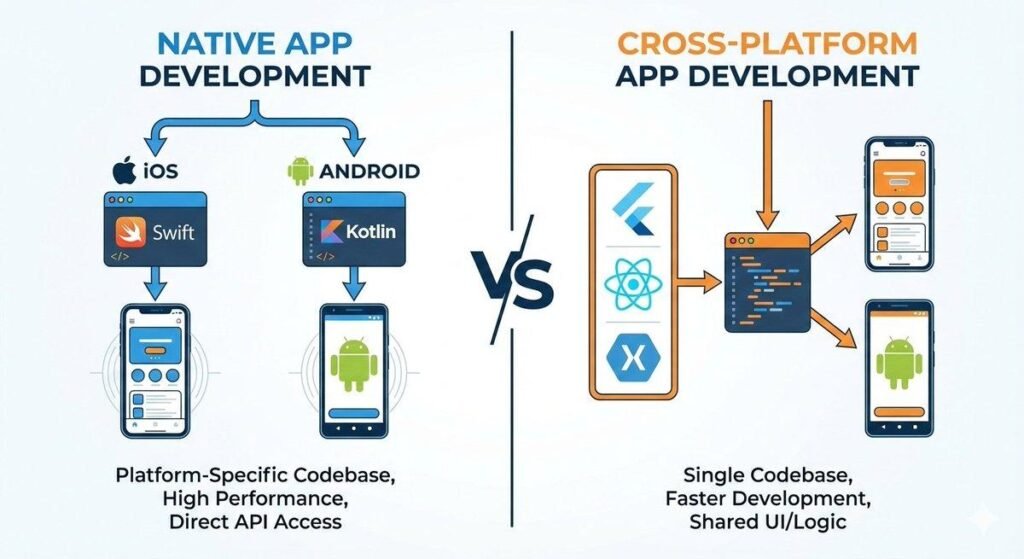
One of the most important decisions in mobile application development is whether to build separate native applications or use a cross-platform framework.
Native development uses platform-specific technologies and tools. Cross-platform development allows teams to share a substantial portion of their code across supported platforms.
Key Differences Between Native and Cross-Platform Tools
| Factor | Native development | Cross-platform development |
|---|---|---|
| Common tools | Android Studio, Xcode | Flutter, React Native, .NET MAUI, Ionic |
| Code reuse | Usually lower across platforms | Often higher across supported platforms |
| Platform integration | Direct access to platform APIs | Depends on framework support and native integrations |
| Team requirements | Platform-specific expertise | Framework-specific expertise |
| Best suited for | Platform-focused or specialized applications | Products targeting multiple platforms with shared code |
Neither approach is automatically better. The right choice depends on application complexity, performance requirements, integrations, team skills, and maintenance plans.
Which Approach Is Right for Your Project?
Choose native development when your application depends heavily on platform-specific APIs, specialized hardware integration, or operating-system-specific behavior.
Choose cross-platform development when shared functionality, consistent user experiences, and coordinated releases across Android and iOS are important.
For example, a business dashboard with shared workflows may be a good candidate for Flutter or React Native. An application that relies on highly specialized device capabilities may benefit from native development or a cross-platform architecture with carefully implemented native modules.
Which Mobile App Development Tools Are Best for Different Projects?
The best mobile app development software depends on the product you are building, your technical team, and your release goals.
Best Tools for Android App Development
Android Studio is a strong starting point for native Android applications because it provides Android-specific coding, debugging, build, and testing capabilities.
Flutter and React Native are alternatives when you want to share code with an iOS application. The right option depends on your interface requirements, platform integrations, and development expertise.
Best Tools for iOS App Development
Xcode is Apple’s primary development environment for native iOS development and release workflows. Flutter and React Native can also support iOS applications when cross-platform development is appropriate.
Consider Apple’s platform requirements, access to macOS build environments, signing and distribution workflows, and the need for native integrations when planning an iOS project.
Best Tools for Cross-Platform App Development
Flutter and React Native are two prominent options for cross-platform mobile app development.
Flutter suits teams that want a widget-based approach and control over consistent interfaces. React Native can be attractive for teams familiar with React, JavaScript, and TypeScript.
Expo can simplify common React Native workflows, while .NET MAUI is worth considering for teams already working with C# and .NET.
Compare the frameworks against your requirements instead of selecting one based only on popularity.
Best Tools for Startups and Small Businesses
Startups and small businesses often need to validate an idea without committing excessive resources before product-market fit is clear.
A practical tool combination may include:
- Figma for wireframes and early prototypes.
- Flutter or React Native for cross-platform application development.
- Firebase for selected backend services.
- Postman for API testing.
- GitHub for source code management.
- Appium or BrowserStack for appropriate testing workflows.
You do not need all these tools for every project. Select the smallest reliable toolset that supports your current requirements and can evolve with your product.
Conclusion
The best mobile app development tools are those that match your product requirements, development team, budget, and long-term plans. Flutter and React Native support cross-platform development, Android Studio and Xcode provide native development environments, and tools such as Firebase, Figma, Appium, Postman, and GitHub help teams manage other essential parts of the development lifecycle.
Rather than choosing tools based only on popularity, evaluate their features, limitations, integration options, and maintenance requirements. A carefully selected toolset can help you build a reliable application while keeping the development process manageable.
If you are planning a new mobile application or improving an existing product, explore our mobile app development services to see how we can translate your project requirements into a practical development plan.
The right combination of development frameworks, design tools, testing solutions, and engineering expertise can provide a stronger foundation for your next mobile application.
Frequently Asked Questions
What Are the Best Mobile App Development Tools in 2027?
The best tools depend on your project requirements. Flutter and React Native support cross-platform development, Android Studio supports native Android development, and Xcode supports Apple’s development ecosystem. Firebase, Figma, Appium, and Postman provide additional capabilities for backend services, design, testing, and API workflows.
Evaluate current capabilities, compatibility, and pricing before making a final selection for a 2027 project.
Which Tools Are Best for Android and iOS App Development?
Flutter and React Native are common options for building Android and iOS applications with shared code. Android Studio and Xcode provide platform-specific development environments. The best choice depends on required features, integrations, performance considerations, and available developer expertise.
What Is the Best Free Mobile App Development Tool?
There is no single best free tool for every project. Flutter and React Native are open-source frameworks, and Android Studio is available without a paid IDE license. Expo also offers a free starting point, although some cloud services have usage limits or paid tiers.
Other tools may offer free plans, trials, or usage-based pricing. Review current terms, quotas, and infrastructure costs before deciding.
Which Tools Support Cross-Platform App Development?
Flutter, React Native, .NET MAUI, and Ionic support cross-platform development through different technical approaches. Expo provides additional tooling for React Native projects. Compare platform support, code reuse, native integration requirements, and your team’s skills before choosing.
Can Beginners Use Mobile App Development Tools?
Yes. Beginners can start with tutorials, sample projects, and development environments designed for their chosen framework. However, building a production-ready application also requires knowledge of programming, interface design, testing, data handling, and security.
Start with a small project, learn the fundamentals, and add more advanced tools as your requirements grow.
How Is AI Used in Mobile App Development Tools?
AI-assisted development features can help with code suggestions, documentation, test generation, debugging, and prototyping. Their usefulness depends on the tool, the task, and the quality of human review.
Developers should verify generated code, test edge cases, protect confidential data, and check licensing and security implications before using AI-generated output in production. Businesses planning to integrate intelligent features can also explore AI development services to understand potential use cases and implementation requirements.
How Do You Choose the Right App Development Tool for Your Business?
Begin by defining your target users, required platforms, core features, integrations, budget, and maintenance expectations. Then compare suitable frameworks and supporting tools against these requirements.
A small prototype can help validate the development approach before committing to a larger build. For complex projects, involve experienced developers early to evaluate architecture, security, scalability, and long-term costs.